What Is RAM in a Laptop? Functions, Types & Capacity
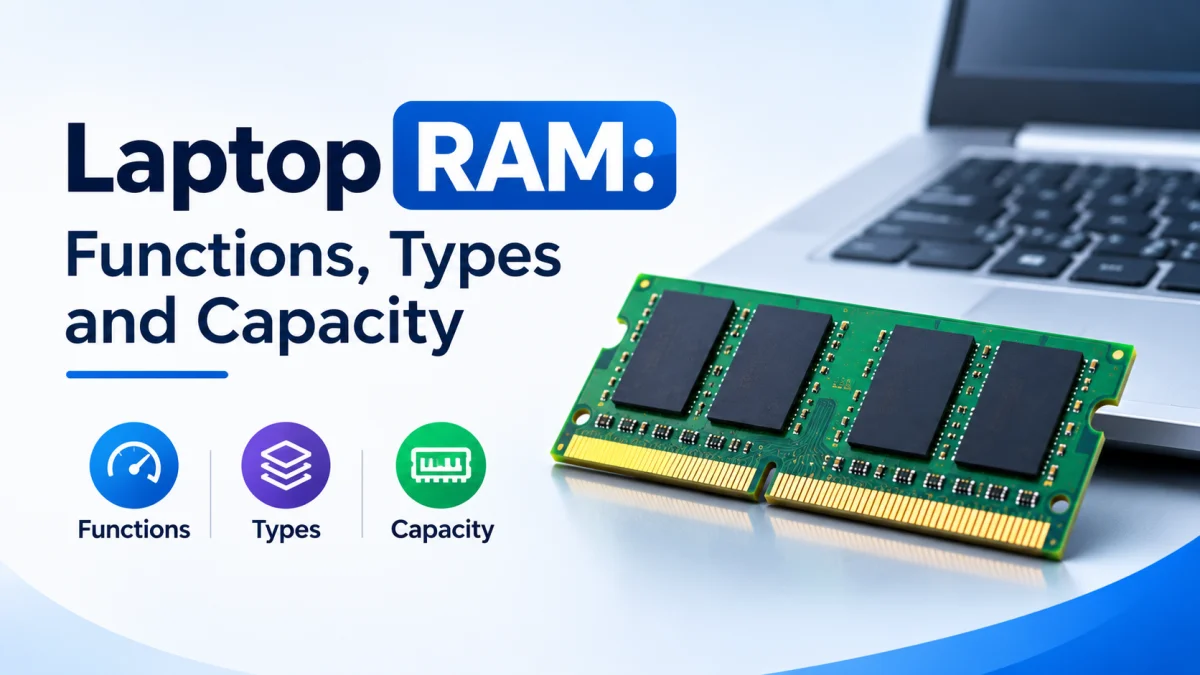
When buying a laptop, you may have noticed specifications such as 8GB RAM, 16GB RAM, or DDR5 memory. But what is RAM in a laptop, and how does it affect your laptop's performance?
RAM, or Random Access Memory, is a type of temporary computer memory that stores the data and instructions your laptop is actively using. It allows the processor to access information quickly, helping applications run smoothly and supporting multitasking.
Understanding laptop RAM is important when choosing a laptop for studying, office work, gaming, programming, or professional tasks. In this guide, we will explain the functions of RAM, different RAM types, memory capacity, and how to choose the right amount of RAM for your needs.
What Is RAM in a Laptop?
RAM stands for Random Access Memory. It is the short-term memory of a laptop that temporarily stores data required by the operating system, applications, and other active processes.
Unlike an SSD or hard drive, RAM is volatile memory. This means it requires power to retain data. When you turn off or restart your laptop, the information stored in RAM is cleared.
In simple terms, RAM works like your laptop's working space. When you open an application, your laptop loads the necessary data into RAM so the processor can access it quickly.
For example, when you open a web browser, watch a video, or edit a document, your laptop uses RAM to keep the information needed for those activities readily available.
What Does RAM Do in a Laptop?
RAM helps your laptop:
Run the operating system and applications.
Keep multiple programs open simultaneously.
Access frequently used data quickly.
Support gaming, video editing, and other demanding tasks.
Maintain smooth performance during multitasking.
The amount of RAM available can affect how many applications your laptop can handle comfortably at the same time.
How Does Laptop RAM Work?
When you open an application, your laptop transfers the required data from its storage drive into RAM. The processor can then access that data much faster than it could retrieve it directly from an SSD or hard drive.
Here is a simple example of how RAM works:
You turn on your laptop and the operating system loads into memory.
You open a web browser, and its active data is loaded into RAM.
You open a document and a music application.
RAM keeps the necessary information available while you switch between applications.
When you close an application, some of the memory it was using becomes available for other tasks.
If your laptop has insufficient RAM, the operating system may need to move some data between RAM and storage. This can cause slower performance, especially when multiple applications are running.
What Are the Main Functions of RAM in a Laptop?
RAM plays an important role in overall laptop performance. It does not determine everything about your laptop's speed, but having sufficient memory helps your processor and applications work efficiently.
1. Running Applications and Programs
Every application requires memory to operate. Whether you are using a web browser, Microsoft Word, Photoshop, or a video player, your laptop uses RAM to store the data required by that application.
Having enough RAM helps applications operate without frequently competing for limited memory resources.
2. Supporting Multitasking
Multitasking means using multiple applications at the same time.
For example, a student might keep a web browser, Microsoft Word, a PDF reader, and a video lecture open simultaneously.
With sufficient RAM, your laptop can keep more of these applications ready for use, making it easier to switch between tasks.
3. Improving System Responsiveness
RAM helps your laptop respond quickly when you interact with applications.
When sufficient memory is available, the system can keep active data readily accessible instead of repeatedly retrieving it from storage.
This can contribute to smoother application switching and a more responsive user experience.
4. Supporting Gaming and Graphics
Many games require RAM to store game assets, level information, and other active data.
RAM can also be important for laptops with integrated graphics because integrated GPUs typically share system memory.
However, gaming performance also depends on the processor, graphics hardware, cooling system, and the game's requirements. More RAM alone does not guarantee higher frame rates.
5. Helping Professional Applications Run Smoothly
Applications such as video editors, design software, programming tools, and 3D applications may require substantial memory.
Having sufficient RAM can help these applications handle larger projects, complex files, and multiple tasks more comfortably.
What Are the Different Types of Laptop RAM?
Laptop RAM comes in different technologies and physical formats. The type of memory supported by a laptop depends on its processor, motherboard, and design.
Understanding these differences can help you choose a compatible laptop or memory upgrade.
DDR3 RAM
DDR3 is an older generation of Double Data Rate memory.
It was widely used in previous-generation laptops and is still found in some older computers.
DDR3 memory generally offers lower data transfer rates than newer generations, but it can still be suitable for basic tasks on compatible laptops.
DDR4 RAM
DDR4 is a later generation of DDR memory that became widely used in modern laptops.
Compared with DDR3, DDR4 generally offers higher data transfer rates and improved power efficiency.
Many older and mid-range laptops use DDR4 memory, making it a common specification when comparing used and refurbished laptops.
DDR5 RAM
DDR5 is a newer generation of DDR memory designed to provide higher bandwidth and improved memory efficiency.
It is used in many newer laptop platforms, including systems designed for gaming, productivity, and demanding workloads.
DDR5 memory is not compatible with DDR4 slots. A laptop must specifically support DDR5 memory to use it.
LPDDR RAM
LPDDR stands for Low Power Double Data Rate memory.
It is designed to reduce power consumption, making it useful for thin, lightweight, and battery-focused laptops.
LPDDR memory is often soldered directly onto the motherboard. This means it may not be upgradeable after purchase.
SO-DIMM vs Soldered RAM
Laptop memory can also differ in physical design.
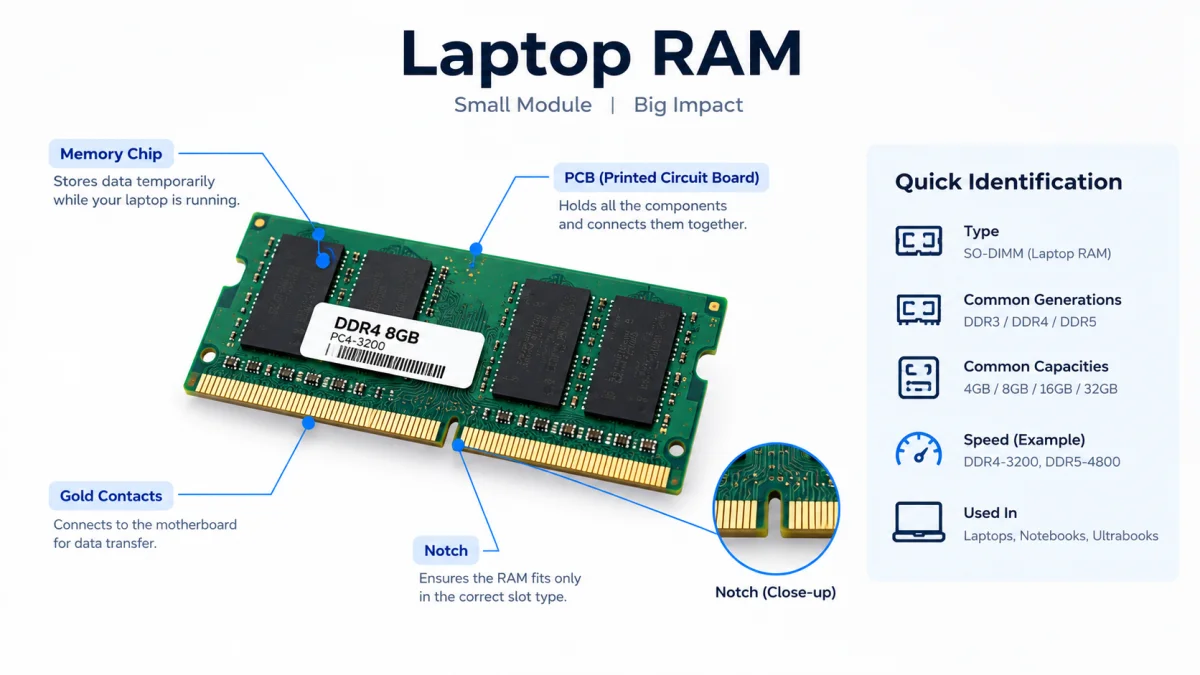
SO-DIMM is a compact memory module format commonly used in laptops. However, not every laptop has removable RAM slots.
Before purchasing a laptop, check whether its memory is upgradeable and whether additional memory slots are available.
What Is RAM Capacity in a Laptop?
RAM capacity refers to the total amount of memory available in a laptop. It is usually measured in gigabytes (GB).
For example:
4GB RAM means the laptop has 4 gigabytes of memory.
8GB RAM means the laptop has 8 gigabytes of memory.
16GB RAM means the laptop has 16 gigabytes of memory.
32GB RAM means the laptop has 32 gigabytes of memory.
Generally, greater RAM capacity allows a laptop to handle more active applications and larger workloads without running out of available memory.
However, the amount of RAM you need depends on how you use your laptop.
How Much RAM Do You Need in a Laptop?
The right RAM capacity depends on your daily activities, software requirements, and budget.
These are general recommendations. Actual requirements vary depending on the operating system, applications, and workload.
Is 4GB RAM Enough for a Laptop?
A laptop with 4GB RAM may handle basic tasks such as simple browsing, document editing, and lightweight applications.
However, modern operating systems and websites can use significant amounts of memory. With multiple browser tabs or applications open, a 4GB laptop may become slow.
For most users buying a laptop today, 4GB RAM is a limited configuration.
Is 8GB RAM Enough for a Laptop?
8GB RAM can be sufficient for everyday activities such as:
Browsing the internet.
Online classes and video meetings.
Microsoft Office applications.
Watching videos.
Basic photo editing.
Light multitasking.
However, users who regularly work with demanding software or keep many applications open may benefit from more memory.
Is 16GB RAM Better Than 8GB RAM?
For many users, 16GB RAM provides more flexibility than 8GB RAM.
It can be particularly useful for people who:
Keep multiple browser tabs open.
Use several applications simultaneously.
Work with programming tools.
Play modern games.
Edit photos or videos.
Want more memory headroom for future software requirements.
If your budget allows, 16GB RAM is a practical choice for a laptop intended for general productivity and multitasking.
Do You Need 32GB RAM for a Laptop?
32GB RAM is useful for demanding workloads that require more memory.
Examples include:
Professional video editing.
Large programming projects and virtual machines.
3D modeling and rendering.
High-end gaming with demanding applications running simultaneously.
Large datasets and specialized professional software.
For basic browsing, office work, and online classes, 32GB RAM is usually unnecessary.
8GB RAM vs 16GB RAM vs 32GB RAM
Choosing between different RAM capacities can be confusing. The following comparison explains how each option may fit different users.
Important: Actual performance also depends on the laptop's processor, graphics hardware, memory speed, and software requirements.
What Is the Difference Between RAM and Storage?
RAM and storage are two different components of a laptop. Although both can be measured in gigabytes, they serve different purposes.
RAM stores data temporarily while your laptop is running. Storage keeps your files and applications even when the laptop is turned off.
Does More RAM Increase Storage Space?
No. Increasing RAM does not increase your laptop's permanent storage capacity.
For example, a laptop with 8GB RAM and a 512GB SSD has 8GB of system memory and 512GB of storage.
If you need more space for documents, photos, videos, and applications, you need a larger SSD or another storage solution.
Does More RAM Make a Laptop Faster?
More RAM can improve laptop performance when the existing memory is insufficient for your workload.
For example, if your laptop frequently runs out of available memory while you use several applications, increasing RAM may reduce slowdowns and improve multitasking.
However, if your laptop already has enough RAM for your everyday tasks, adding more memory may produce little noticeable improvement.
Laptop performance also depends on:
Processor performance.
Graphics hardware.
SSD speed.
Cooling and thermal performance.
Operating system and software optimization.
Therefore, RAM should be considered alongside other laptop specifications rather than as the only measure of performance.
Can You Upgrade RAM in a Laptop?
Some laptops allow users to upgrade RAM, while others have memory permanently integrated into the motherboard.
Whether you can upgrade RAM depends on your laptop's specific model and hardware design.
How to Check If Your Laptop RAM Is Upgradeable
Before purchasing a memory upgrade, check the following:
Find your laptop's exact model number.
Visit the manufacturer's official support website.
Check the technical specifications or service manual.
Confirm whether the laptop has removable RAM slots.
Check the maximum supported memory capacity.
Verify the supported DDR generation, memory speed, and module type.
If your laptop has soldered RAM, you generally cannot replace or add memory through a standard RAM upgrade.
Can You Add More RAM to a Laptop?
If your laptop has an available memory slot, you may be able to add another compatible RAM module.
For example, a laptop with 8GB RAM and one available compatible slot may support an additional memory module.
However, the actual upgrade options depend on the laptop's supported memory configuration. Always verify compatibility before buying RAM.
How to Check RAM in a Laptop
You can check your laptop's installed RAM through Windows settings.
How to Check RAM in Windows 11
Open the Start menu.
Click Settings.
Select System.
Click About.
Find the Installed RAM section.
This will show the installed memory capacity of your laptop.
How to Check RAM in Windows 10
Open the Start menu.
Select Settings.
Click System.
Select About.
Check the Installed RAM information.
You can also use Task Manager to view memory usage and other memory details.
How to Check RAM Speed and Usage
Press Ctrl + Shift + Esc to open Task Manager.
Select the Performance tab.
Click Memory.
Here, you can view information such as installed memory, current memory usage, and supported memory details reported by Windows.
What Should You Consider When Buying a Laptop Based on RAM?
When comparing laptop specifications, do not focus only on the RAM capacity. Consider the complete memory configuration.
1. RAM Capacity
Choose a capacity that matches your everyday workload. For many users, 8GB is suitable for basic use, while 16GB offers more flexibility for multitasking.
2. RAM Generation
Check whether the laptop uses DDR4, DDR5, or another supported memory technology.
Different generations are not interchangeable, so compatibility matters when upgrading.
3. RAM Speed
RAM speed affects how quickly memory can transfer data. However, the laptop must support the memory's rated speed, and actual performance depends on the complete hardware configuration.
4. Upgradeability
Check whether the RAM is soldered or installed in removable slots.
A laptop with upgradeable memory may offer more flexibility if your requirements increase in the future.
5. Processor and Graphics
RAM works together with the processor and graphics hardware. A laptop with more RAM is not automatically faster than a laptop with a better processor or graphics configuration.
For the best experience, compare all major specifications before making a purchase.
Frequently Asked Questions About Laptop RAM
What Is RAM in a Laptop Used For?
RAM stores the data and instructions that your laptop is actively using. It helps applications run, supports multitasking, and allows the processor to access active information quickly.
Is 8GB RAM Enough for a Laptop?
8GB RAM is generally suitable for basic everyday activities such as browsing, office work, online classes, and light multitasking. Users running demanding applications may benefit from 16GB or more.
Is 16GB RAM Better Than 8GB RAM?
16GB RAM provides more memory capacity than 8GB, making it useful for multitasking, programming, gaming, and demanding applications. However, the benefit depends on how much memory your workload actually requires.
Does More RAM Make a Laptop Faster?
More RAM can improve performance when your laptop does not have enough memory for its active tasks. If sufficient RAM is already available, adding more may not noticeably improve performance.
Can a Laptop Run Without RAM?
A laptop generally cannot boot and operate normally without functional system memory. RAM is essential for loading the operating system and running applications.
What Is the Difference Between DDR4 and DDR5 RAM?
DDR4 and DDR5 are different generations of memory technology. DDR5 generally offers higher data transfer rates and improved memory efficiency, but the two generations are not interchangeable.
Can I Upgrade RAM on Every Laptop?
No. Some laptops have removable RAM modules, while others use soldered memory. Always check the exact laptop model's specifications before planning an upgrade.
How Much RAM Is Best for Students?
For many students, 8GB RAM is sufficient for browsing, document editing, online classes, and everyday tasks. Students who use demanding software or multitask heavily may benefit from 16GB RAM.
Conclusion
RAM is an essential component of every laptop because it provides the temporary memory required to run applications and support multitasking.
Understanding what RAM is in a laptop, its functions, types, and capacity can help you make a more informed purchasing decision.
For basic everyday use, 8GB RAM may be sufficient. For users who need more flexibility for multitasking, productivity, and demanding applications, 16GB RAM is a practical option. Users working with specialized professional software may benefit from 32GB or more.
Before buying a laptop, consider its RAM capacity, memory generation, speed, upgradeability, processor, and overall specifications to choose a configuration that suits your needs.