What Is a Laptop Processor (CPU)? Types & Performance
When buying a laptop, the processor is one of the most important specifications to consider. You may have seen names such as Intel Core i5, Intel Core Ultra 7, AMD Ryzen 5, or AMD Ryzen 7 in laptop specifications. But what is a laptop processor, and how does it affect performance?
A laptop processor, also known as the Central Processing Unit (CPU), is the main component responsible for executing instructions and processing data. It helps your laptop run applications, perform calculations, manage tasks, and respond to user commands.
Understanding laptop processor types, performance specifications, and different CPU series can help you choose the right laptop for studying, office work, gaming, programming, or professional tasks.
In this guide, we will explain how laptop processors work, the differences between Intel and AMD CPUs, and which processor category may be suitable for your needs.
What Is a Laptop Processor (CPU)?
A laptop processor is a central computing component that executes instructions and processes data required by the operating system, applications, and other hardware components.
CPU stands for Central Processing Unit. It is often described as the brain of a computer because it performs calculations, executes program instructions, and coordinates many computing operations.
For example, when you open a web browser, edit a document, or launch a game, the processor executes the instructions required to perform those tasks.
The processor works together with other components, including RAM, storage, and graphics hardware, to provide a complete computing experience.
What Does a Laptop Processor Do?
A laptop processor performs several important functions:
Executes instructions from applications and the operating system.
Performs mathematical and logical calculations.
Processes data and manages computing tasks.
Supports multitasking by executing instructions from different applications.
Coordinates with RAM, storage, and other hardware.
Helps determine how quickly applications respond and complete tasks.
The processor's performance can affect everything from opening applications to completing demanding professional workloads.
How Does a Laptop CPU Work?
When you open an application, your laptop loads the necessary program data from storage into RAM. The processor then executes the application's instructions using the available data.
A simplified CPU process includes three main stages:
Fetch: The processor retrieves an instruction from memory.
Decode: The processor interprets what the instruction requires.
Execute: The processor performs the required operation.
Modern processors use advanced techniques such as instruction pipelining, caching, and parallel execution to process instructions efficiently.
The CPU repeats these operations continuously while your laptop is running.
What Are the Main Functions of a Laptop Processor?
A laptop processor is responsible for many of the operations that make a computer useful.
1. Processing Instructions and Data
The CPU executes instructions from the operating system and applications.
Whether you are calculating numbers in a spreadsheet, editing a document, or running a software program, the processor performs the required computing operations.
2. Running Applications and Software
Every application requires processing power to operate.
A processor with suitable performance can help applications launch, respond, and complete tasks efficiently.
However, application performance also depends on RAM, storage speed, graphics hardware, and software optimization.
3. Supporting Multitasking
Multitasking means running or switching between multiple applications.
Modern laptop processors contain multiple cores that can execute different tasks simultaneously.
A processor with more suitable cores and processing resources can help handle demanding multitasking workloads more efficiently.
4. Supporting Gaming and Graphics
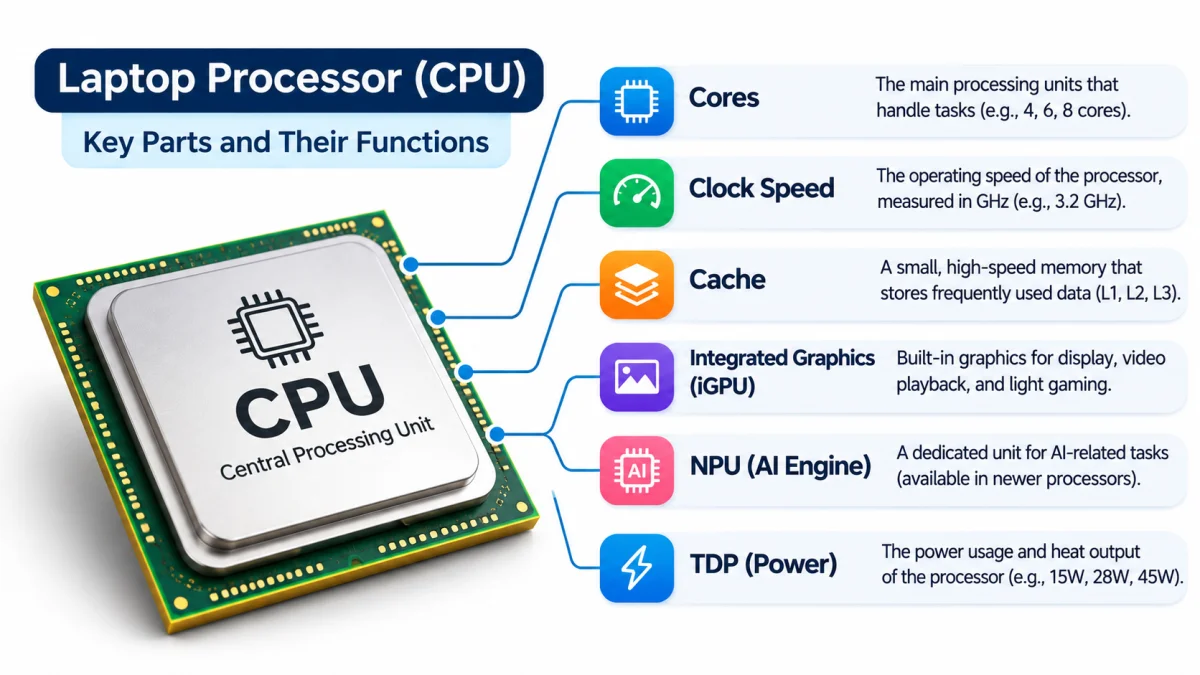
Many laptop processors include integrated graphics, which can display images, videos, and graphics without requiring a separate graphics card.
However, demanding games and professional graphics applications may benefit from a dedicated GPU.
Gaming performance depends on the processor, graphics hardware, RAM, cooling system, and the game's requirements.
5. Managing System Performance
The processor works with the operating system and other hardware components to manage computing tasks.
It also adjusts its operating frequency and power consumption according to workload, temperature, and system power limits.
This helps balance performance, battery life, and heat generation.
What Are the Different Types of Laptop Processors?
Laptop processors are available from several manufacturers. Each offers different processor families designed for various performance levels, power requirements, and laptop categories.
The main laptop processor brands include Intel, AMD, Apple, and Qualcomm.
Intel Laptop Processors
Intel is one of the major manufacturers of laptop CPUs.
Intel processors are used in many laptops designed for students, office users, professionals, and gamers.
Common Intel laptop processor families include:
Intel Core 3, Core 5, Core 7, and Core 9.
Intel Core Ultra processors.
Intel Processor and Intel Core processor families from earlier naming systems.
Intel processor naming varies by generation and product family. Therefore, checking the exact processor model is important when comparing laptops.
AMD Ryzen Laptop Processors
AMD Ryzen processors are widely used in laptops for everyday computing, productivity, gaming, and professional workloads.
Common AMD Ryzen laptop processor categories include:
AMD Ryzen 3.
AMD Ryzen 5.
AMD Ryzen 7.
AMD Ryzen 9.
AMD Ryzen AI processor families.
AMD also uses different processor series and model numbers to distinguish product generations and performance categories.
Apple Silicon Laptop Processors
Apple Silicon processors are used in Apple's MacBook laptops.
These processors integrate CPU, GPU, and other computing components into a system-on-chip design.
Apple's laptop processor families include M-series chips such as M1, M2, M3, M4, and newer generations.
Apple Silicon processors are designed to work closely with macOS and Apple's hardware architecture.
Qualcomm Snapdragon Laptop Processors
Qualcomm Snapdragon processors are used in selected Windows laptops.
Many Snapdragon laptop processors use Arm-based architecture and are designed to support power-efficient computing, long battery life, and modern connectivity features.
Compatibility with applications can vary depending on the processor architecture and software support.
Understanding Intel Laptop Processor Series
Intel offers several processor families for laptops, including mainstream and premium performance categories.
Intel Core 3, Core 5, Core 7 and Core 9
Intel's newer Core branding includes Core 3, Core 5, Core 7, and Core 9 processors in relevant product families.
These categories provide a general indication of product positioning, not a guaranteed performance ranking across every generation.
For example, a newer Core 5 processor may outperform an older Core 7 processor in certain workloads.
Intel Core Ultra Processors
Intel Core Ultra processors are designed for modern laptops, including premium and performance-focused systems.
Depending on the specific model, Core Ultra processors may include:
CPU cores for general computing.
Integrated graphics.
An integrated Neural Processing Unit (NPU) for supported AI workloads.
Features designed to balance performance and power efficiency.
Not every Core Ultra processor has identical capabilities. Always check the specifications of the exact model.
Intel Processor Generations
Intel has released multiple generations of laptop processors with changes in architecture, performance, power efficiency, and features.
When comparing processors, the generation and exact model number can be more useful than looking only at Core i3, i5, i7, or i9 branding.
For example, two Intel Core i5 processors from different generations may have different core counts, clock speeds, graphics capabilities, and performance.
Intel U, P, H and HX Series
Intel has used different suffixes and product categories to distinguish laptop processor designs.
These designations vary across Intel processor generations and naming systems. They should be treated as general product-positioning indicators rather than exact performance guarantees.
Understanding AMD Ryzen Laptop Processors
AMD Ryzen processors are available in multiple performance categories designed for different laptop users.
AMD Ryzen 3, Ryzen 5, Ryzen 7 and Ryzen 9
As with Intel, the exact processor model and generation are important.
A newer Ryzen 5 processor may offer better performance or efficiency than an older Ryzen 7 processor in some situations.
AMD Ryzen AI Processors
AMD Ryzen AI processors include models with integrated AI acceleration hardware.
Depending on the exact processor, these systems may include:
CPU cores for general computing.
Integrated Radeon graphics.
An NPU for supported AI workloads.
AI features and performance vary by model, so users should verify the specifications rather than relying only on the Ryzen AI name.
AMD U, HS, H and HX Series
AMD has used different suffixes to indicate laptop processor design categories.
The exact meaning and specifications can vary between processor generations.
What Determines Laptop Processor Performance?
A processor's performance depends on several technical specifications. Understanding these factors can help you compare laptops more accurately.
1. CPU Clock Speed
Clock speed indicates how many clock cycles a processor performs per second.
It is commonly measured in gigahertz (GHz).
For example, a processor with a maximum boost frequency of 4.5GHz can reach that frequency under suitable operating conditions.
However, a higher clock speed does not automatically mean a faster processor.
Different CPU architectures can perform different amounts of work per clock cycle. Cooling, power limits, and workload also affect actual performance.
2. Number of Cores
A CPU core is a processing unit capable of executing instructions.
Processors with multiple cores can execute different tasks in parallel.
For example:
2-core processors may be suitable for basic workloads.
4-core processors can support many everyday and productivity tasks.
6-core or 8-core processors can provide more resources for multitasking and demanding workloads.
Higher-core-count processors may benefit specialized professional applications.
Core count alone does not determine performance. Core architecture, efficiency, and software optimization also matter.
3. Threads
Threads represent sequences of instructions that can be scheduled for execution.
Some processors support simultaneous multithreading, allowing a physical core to handle more than one software thread.
This can improve performance in supported workloads.
However, more threads do not always produce proportional performance improvements.
4. Cache Memory
Cache is a small amount of high-speed memory located within or close to the processor.
It stores frequently accessed data and instructions so the CPU can retrieve them quickly.
Common cache levels include:
L1 Cache.
L2 Cache.
L3 Cache.
Cache design and capacity can influence processor performance, particularly in workloads that repeatedly access the same data.
5. CPU Architecture and Generation
Processor architecture determines how the CPU is designed to execute instructions and manage computing resources.
Newer processor generations may introduce improvements in performance, power efficiency, graphics, and supported technologies.
However, a newer generation does not guarantee that every model is faster than every older processor.
Always compare the exact processor model.
6. Thermal Design and Power Limits
Laptop processors operate within power and temperature limits.
The laptop's cooling system affects how long a processor can maintain higher performance levels.
A laptop with better cooling may sustain demanding workloads more effectively than a thinner system with limited thermal capacity, even when both use similar processors.
What Is the Difference Between Intel Core i3, i5, i7 and i9?
Intel Core i3, i5, i7, and i9 have traditionally represented different processor performance categories.
However, Intel's newer processor naming systems also include Core 3, Core 5, Core 7, Core 9, and Core Ultra families.
The exact processor model matters when comparing performance.
Intel Core i3 vs Core i5
Core i3 processors are generally designed for basic computing and everyday tasks.
Core i5 processors often offer more processing resources and may be better suited for multitasking, productivity, and demanding applications.
For many users, Core i5-class laptops provide a practical balance of performance and price.
Intel Core i5 vs Core i7
Core i7 processors are generally positioned above Core i5 processors within comparable product families.
They may offer higher core counts, stronger performance, or additional features, depending on the model.
However, an older Core i7 processor is not automatically faster than a newer Core i5 processor.
Intel Core i7 vs Core i9
Core i9 processors are generally positioned for higher-performance workloads.
They may be suitable for users who need additional processing power for demanding applications.
However, actual performance depends on the exact processor model, laptop cooling, and power limits.
What Is the Difference Between Intel and AMD Laptop Processors?
Intel and AMD both offer laptop processors for everyday computing, productivity, gaming, and professional workloads.
Neither brand is automatically better for every user.
Which Is Better for Gaming?
Both Intel and AMD offer processors suitable for gaming laptops.
However, gaming performance often depends more heavily on the graphics hardware than on the CPU alone.
For demanding games, compare the processor, GPU, RAM, cooling system, and display specifications together.
Which Is Better for Battery Life?
Battery life depends on the entire laptop design, including the processor, battery capacity, display, cooling system, and power management.
Both Intel and AMD offer power-efficient laptop processors.
For the best battery life, check independent reviews of the exact laptop model rather than choosing based only on processor brand.
Which Laptop Processor Is Best for Different Users?
The best laptop processor depends on your daily tasks, software requirements, and budget.
Best Processor for Students
Students who mainly browse the internet, attend online classes, prepare documents, and watch videos may not need a high-end processor.
A modern entry-level or mainstream processor can be sufficient for these activities.
For students who use programming tools, engineering software, or demanding applications, a more capable processor may be useful.
Best Processor for Office Work
Office users typically need a processor that can handle web browsers, spreadsheets, video meetings, and productivity applications.
A mainstream processor is often sufficient.
Users who regularly work with large spreadsheets, complex data, or multiple demanding applications may benefit from higher-performance options.
Best Processor for Programming
Programming requirements vary widely.
Basic web development and general coding can work well on mainstream processors.
Software development involving virtual machines, large codebases, compiling, or multiple development tools may benefit from more processing cores and higher performance.
Best Processor for Gaming
Gaming laptops require a suitable combination of CPU and GPU performance.
A mainstream or high-performance CPU may be appropriate depending on the graphics hardware and games you play.
For demanding gaming, consider:
Processor performance.
Dedicated GPU.
RAM capacity.
Cooling system.
Display refresh rate.
Game requirements.
Best Processor for Video Editing
Video editing workloads can require substantial CPU, GPU, RAM, and storage resources.
For basic editing, a mainstream processor may be sufficient.
For professional editing, high-resolution video, complex effects, and demanding projects, a high-performance processor may provide a better experience.
How to Check the Processor in a Laptop
You can check your laptop's processor information through Windows.
How to Check CPU Name in Windows 11
Open the Start menu.
Click Settings.
Select System.
Click About.
Find the Processor section.
Windows will display the processor name and model.
How to Check CPU Name in Windows 10
Open the Start menu.
Select Settings.
Click System.
Select About.
Find the Processor information.
You can also open Task Manager and select the Performance tab to view processor usage and other details.
How to Check Processor Speed and Cores
Press Ctrl + Shift + Esc to open Task Manager.
Select the Performance tab.
Click CPU.
You can view information such as:
CPU model.
Current operating frequency.
Number of cores.
Number of logical processors.
CPU utilization.
For detailed specifications, visit the processor manufacturer's official website and search for the exact model number.
What Should You Consider When Buying a Laptop Based on CPU?
When comparing laptop processors, consider the following factors.
1. Exact Processor Model
Do not compare processors using only Core i5, Core i7, Ryzen 5, or Ryzen 7 labels.
Check the complete model name and generation.
2. Performance Requirements
Choose a processor that matches the applications you plan to use.
Basic browsing requires less processing power than video editing, gaming, or professional software.
3. RAM Capacity
The processor works with RAM to run applications and manage active tasks.
Make sure the laptop has sufficient memory for your intended workload.
4. Graphics Hardware
Some laptops use integrated graphics, while others include dedicated GPUs.
If you need gaming or professional graphics performance, check the graphics specifications carefully.
5. Cooling System
Cooling affects how well the processor maintains performance during demanding workloads.
A laptop's cooling design is especially important for gaming and professional applications.
6. Battery Life
If you travel frequently or work away from a power outlet, consider processor efficiency, battery capacity, and independent battery-life reviews.
Frequently Asked Questions About Laptop Processors
What Is a Laptop Processor Used For?
A laptop processor executes instructions, processes data, runs applications, and performs calculations. It is one of the main components responsible for overall computing performance.
Is Intel Core i5 Good for a Laptop?
Intel Core i5 processors can be suitable for students, office users, and many productivity workloads. However, the exact model and generation determine actual performance.
Is AMD Ryzen 5 Good for a Laptop?
AMD Ryzen 5 processors are generally positioned for mainstream computing and productivity. They can be suitable for everyday work, multitasking, and selected gaming workloads, depending on the exact model.
Which Laptop Processor Is Better, Intel or AMD?
Neither brand is universally better. Compare the exact processor model, performance, power efficiency, graphics, and price to choose the right laptop.
Does a Higher GHz Mean a Faster Laptop?
Not necessarily. Clock speed is only one factor in CPU performance. Architecture, core count, cache, power limits, and cooling also influence performance.
How Many CPU Cores Do I Need in a Laptop?
Basic computing can work well with entry-level processors. Multitasking, gaming, programming, and professional workloads may benefit from additional cores, depending on the software requirements.
Can I Upgrade the Processor in a Laptop?
Most modern laptops have processors soldered to the motherboard, making standard CPU upgrades impractical or impossible. Always check the laptop's hardware design before considering an upgrade.
Is a Newer Laptop Processor Always Better?
Not always. Newer processors may offer architectural improvements, but actual performance depends on the exact model and workload. Compare real specifications and independent benchmarks when available.
Conclusion
A laptop processor is one of the most important components that determines how efficiently a laptop executes instructions and handles computing tasks.
Understanding laptop processor types and performance can help you choose a laptop that matches your needs, whether you are a student, office user, gamer, programmer, or professional.
When comparing processors, consider the exact model, generation, clock speed, cores, cache, power efficiency, and cooling system rather than relying only on processor branding.
For everyday computing, a mainstream processor may be sufficient. For gaming, professional applications, and demanding workloads, a higher-performance processor paired with suitable RAM and graphics hardware may provide a better experience.
Before buying a laptop, compare its complete specifications to make an informed decision.