SSD vs HDD: Which Is Better for Your Laptop?
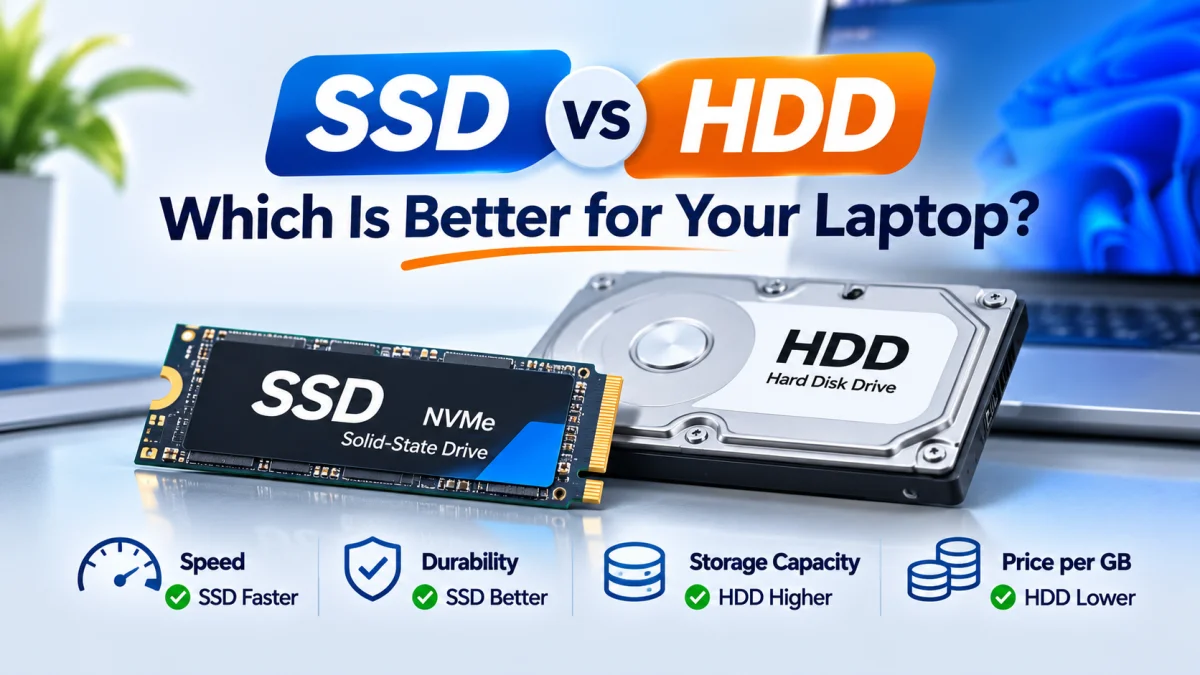
Choosing the right storage device is important when buying or upgrading a laptop. Two common storage types are SSD (Solid-State Drive) and HDD (Hard Disk Drive). Both store your operating system, applications, documents, photos, videos, and other files, but they work differently.
The main difference between SSD and HDD is speed. An SSD can make a laptop start faster, open applications more quickly, and feel more responsive during everyday tasks. An HDD usually offers more storage capacity at a lower price, making it useful for storing large files.
So, SSD vs HDD: Which is better for your laptop? The right choice depends on your budget, storage needs, and how you use your laptop. This guide explains their differences to help you make an informed decision.
What Is an SSD in a Laptop?
An SSD (Solid-State Drive) is a storage device that uses flash memory to store data. Unlike a traditional hard drive, an SSD has no spinning disks or moving read/write parts.
Because it can access data electronically, an SSD generally provides faster performance than an HDD. It is commonly used to store Windows, software, games, and personal files.
How Does an SSD Work?
An SSD stores data in memory chips. When you open a file or application, the drive retrieves the required data electronically instead of waiting for a mechanical disk to spin and a read head to reach the correct location.
This helps an SSD deliver faster access times and better responsiveness.
Common Types of Laptop SSDs
Important: M.2 describes the physical form factor, while SATA and NVMe describe different storage interfaces or protocols. Not every M.2 slot supports NVMe, so check your laptop’s specifications before buying an SSD.
What Is an HDD in a Laptop?
An HDD (Hard Disk Drive) is a traditional storage device that stores data on rotating magnetic disks. It uses mechanical components, including spinning platters and a read/write head, to access information.
HDDs have been used in laptops and desktop computers for many years. They are still useful when a user needs a large amount of storage without spending as much as they would on an SSD.
How Does an HDD Work?
When a laptop reads or saves data on an HDD, its magnetic platters spin while a read/write head accesses the required information.
Because the drive depends on moving parts, it usually takes longer to access data than an SSD. Mechanical movement also makes an HDD more sensitive to physical shocks while operating.
Common Laptop HDD Capacity
Laptop HDDs are commonly available in capacities such as:
500GB
1TB
2TB
The available capacity and compatibility depend on the laptop model and the drive’s physical size and interface.
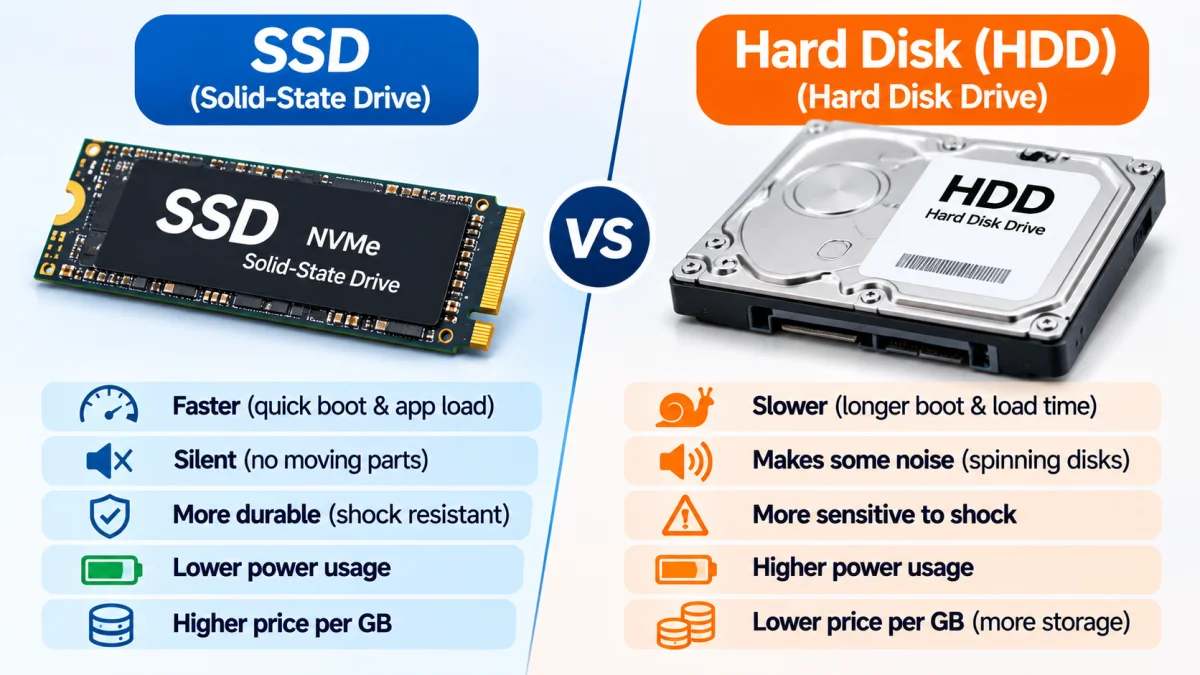
SSD vs HDD: Key Differences
The following table compares the main differences between SSD and HDD storage.
Actual performance varies depending on the drive model, interface, laptop hardware, and workload.
SSD vs HDD: Which Is Faster?
An SSD is generally much faster than an HDD, especially when starting the operating system, opening applications, and accessing many small files.
Here are some common tasks where an SSD can make a noticeable difference:
1. Laptop Startup
A laptop with an SSD will generally start Windows faster than a similar laptop using an HDD. The exact startup time depends on the operating system, installed software, and other hardware.
2. Opening Applications
Applications stored on an SSD often open more quickly because the drive can access data with lower latency.
3. File Transfer
An SSD can transfer files faster than many HDDs, particularly when working with numerous small files. However, actual transfer speeds depend on the drive, file sizes, and connection.
4. Everyday Performance
An SSD can make a laptop feel more responsive during everyday use, including browsing, document editing, and switching between applications.
Remember: Storage is only one part of laptop performance. The processor, RAM, operating system, and software also affect how smoothly a laptop runs.
SSD vs HDD: Which Is Better for Students?
For most students, an SSD is the better choice.
Students commonly use laptops for online classes, web browsing, research, presentations, assignments, and office applications. An SSD can help Windows and frequently used applications load more quickly.
For a laptop used mainly for study and everyday work, a 256GB or 512GB SSD can be a practical starting point. Choose more capacity if you regularly store large files, games, or creative projects.
SSD vs HDD for Gaming
For gaming, an SSD is generally recommended because it can reduce game loading times and help games load assets more quickly.
However, installing a game on an SSD does not automatically increase its frame rate (FPS). FPS is influenced mainly by the laptop’s processor, graphics hardware, memory, and the game’s settings.
If your budget allows, choose a laptop with an SSD for Windows and your frequently played games.
SSD vs HDD: Which Is More Durable?
An SSD has no spinning platters or mechanical read/write head, so it is generally more resistant to physical movement and shocks than an HDD.
An HDD contains moving mechanical parts. A strong impact while the drive is operating can potentially damage it or cause data loss.
However, neither SSD nor HDD is a substitute for a backup. Important files should be backed up to another drive or a reliable cloud storage service.
SSD vs HDD: Which Uses Less Power?
SSDs generally use less power than traditional laptop HDDs, although power consumption varies by drive model and workload.
An SSD can also help a laptop feel more responsive without relying on mechanical movement. However, battery life depends on several components, including the display, processor, battery condition, and software.
Can You Upgrade a Laptop from HDD to SSD?
In many laptops, it is possible to replace an HDD with an SSD. Some laptops also support adding a second storage drive, but this depends on the model.
Before buying an SSD, check:
Your laptop’s exact model number
Whether it supports a 2.5-inch SATA SSD
Whether it has an M.2 slot
Whether the M.2 slot supports SATA, NVMe, or both
The maximum supported storage capacity, if specified
Whether an existing drive must be removed to install the new one
If you are replacing your current HDD, you may need to reinstall Windows or clone your existing drive. Always back up important files before upgrading.
Should You Choose an SSD or HDD?
The best storage option depends on your needs.
Choose an SSD If:
You want Windows to start faster
You want applications to open more quickly
You use your laptop for study, office work, or everyday tasks
You want a quieter storage device
You want better resistance to movement and physical shocks
Choose an HDD If:
You need a large amount of storage at a lower cost
You mainly store videos, photos, archives, or backups
Storage capacity matters more to you than speed
Your laptop supports an HDD and you do not need faster everyday performance
Choose Both SSD and HDD If:
Your laptop supports two storage drives, you can use an SSD for Windows and applications and an HDD for large files. This setup combines faster everyday performance with additional storage capacity.
SSD vs HDD: Final Verdict
For most modern laptop users, an SSD is the better choice. It generally provides faster startup, quicker application loading, silent operation, and a more responsive everyday experience.
An HDD can still be a practical option when you need more storage capacity at a lower cost. If your laptop supports both drive types, using an SSD for the operating system and an HDD for large files can be a useful combination.
When choosing a laptop, consider the storage capacity as well as the type of drive. A suitable SSD, enough RAM, and a capable processor can help create a smoother overall laptop experience.
Frequently Asked Questions
Is an SSD better than an HDD for a laptop?
For most everyday laptop tasks, yes. An SSD generally offers faster startup, application loading, and file access. An HDD may be preferable when you need high storage capacity at a lower price.
How much faster is an SSD than an HDD?
The difference depends on the specific drives and workload. SSDs generally have much lower access latency and can provide substantially faster data transfer, especially compared with traditional laptop HDDs.
Is a 256GB SSD better than a 1TB HDD?
For many users, a 256GB SSD can provide a faster everyday experience. A 1TB HDD offers more storage space. The better option depends on whether speed or capacity is more important to you.
Can I replace my laptop HDD with an SSD?
Many laptops allow an HDD to be replaced with a compatible SATA SSD. Some models support M.2 SSDs instead. Check your laptop’s model and storage specifications before purchasing.
Does an SSD improve laptop performance?
An SSD can improve startup time, application loading, and general responsiveness. It does not replace the need for a capable processor or sufficient RAM.
Which is better for gaming, SSD or HDD?
An SSD is generally better for game loading and asset access. It does not automatically increase FPS, which depends mainly on the processor, graphics hardware, RAM, and game settings.
Do SSDs last longer than HDDs?
SSDs are generally more resistant to physical shocks because they have no moving mechanical parts. Both types can fail, so keeping backups of important files is recommended.